Real-time, AI-assisted protection for Linux servers: cPanel, CyberPanel, CloudPanel, Docker and plain nginx or Apache
Stop attacks before they reach your sites
TurnUpSecurity Shield protects every Linux server you run, with or without a control panel. It drops floods in the network driver, blocks brute force and web exploits in milliseconds, keeps ModSecurity rules up to date, quarantines malware, and shares what one server learns with all of them.
- Blocks in milliseconds
- ~10 MB memory
- Works with CSF & ModSecurity
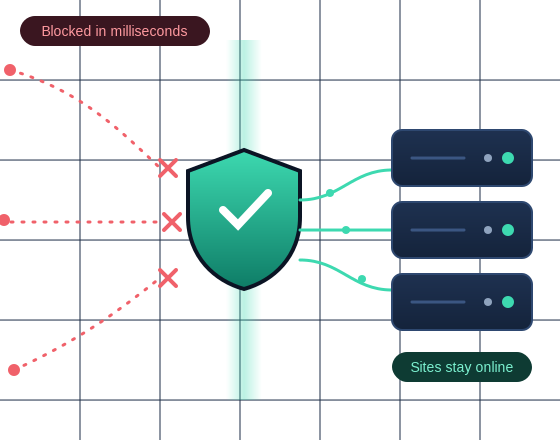
Protection at every layer

Network
SYN, UDP and ICMP floods and known-bad networks are dropped in the network driver with XDP, before the kernel spends any work on them.

Logins
SSH, cPanel, webmail, FTP, IMAP and SMTP password guessing is blocked within milliseconds of the failures being logged.

Web apps
SQL injection, XSS, exploits, WordPress and XML-RPC abuse are stopped through ModSecurity and our own rule set.

Malware
Web shells, backdoors, injected code and miners are found, quarantined or repaired. Tampered WordPress, Drupal, Joomla and OpenCart core files are restored to the official version automatically.

Fleet intel
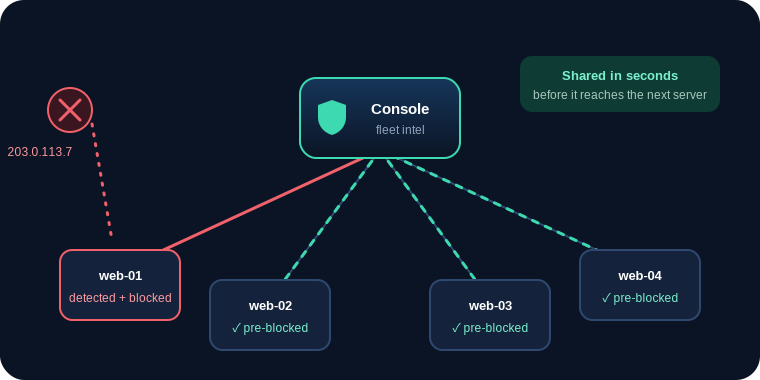
An attacker blocked on one server is blocked on every server within seconds, often before it reaches them.

AI analyst
New attack patterns and new malware get targeted rules and signatures drafted by AI. You approve them once; they ship to every server.
Works with your stack
cPanel servers, CyberPanel and CloudPanel boxes, Docker hosts and plain Ubuntu, Debian or AlmaLinux servers running nginx or Apache: one agent protects them all, and one console manages them together.
cPanel & WHMFull support
The deepest integration: everything Security Shield does, plus pages inside WHM and cPanel.
- WHM dashboard and a cPanel page for each customer
- Our rules appear in WHM › ModSecurity Vendors
- Works alongside CSF and CloudLinux
- Malware scanning of every account's sites
CyberPanelFull support
OpenLiteSpeed servers get the same real-time protection and live ModSecurity rule updates.
- Rules go straight into OpenLiteSpeed's ModSecurity
- Watches every site's access and error logs
- Malware scanning of /home/*/public_html
- Turn on ModSecurity in CyberPanel, then install
CloudPanelFull support
nginx-based CloudPanel servers are protected at the network, login and web layers.
- Reads each site's nginx logs for floods and scanners
- Malware scanning of every site in /home/*/htdocs
- ModSecurity rule sync where the module is installed
- Fleet-wide blocking and threat feeds
PleskFull support
Plesk servers get our live ModSecurity rules on top of the rule set chosen in Plesk's Web Application Firewall.
- Our rules load next to Plesk's WAF rule set (OWASP, Comodo or Atomic)
- Blocks brute force on SSH, mail, FTP and logins
- Malware scanning of /var/www/vhosts
- Turn on Web Application Firewall in Plesk first
DirectAdminFull support
DirectAdmin servers with CustomBuild ModSecurity get our live rules alongside their own.
- Rules load from /etc/modsecurity.d and survive CustomBuild rebuilds
- Network, login and web-attack blocking
- Malware scanning of every user's domains
- Install ModSecurity with CustomBuild first
DockerFull support
Docker hosts are protected along with the containers they publish.
- Blocks also apply to published container ports (DOCKER-USER)
- XDP drops floods before they reach any container
- Watches the host's web server and SSH logs
- Never touches your containers or images
nginxFull support
Plain nginx servers get ModSecurity, the OWASP Core Rule Set and our live rules in one command.
- tusctl waf setup --install adds ModSecurity + OWASP CRS
- Rule updates are config-tested and rolled back on failure
- HTTP flood, 404-scan and WordPress abuse detection
- Works with your existing ModSecurity setup
ApacheFull support
Apache servers on Debian, Ubuntu and RHEL-family systems get live rule updates through mod_security2.
- Rules load from their own folder, separate from yours
- apachectl config test before every update
- Turns ModSecurity blocking on for new installs
- Reads Apache's access and error logs
UbuntuSupported
Ubuntu 22.04 LTS and newer, including 24.04 and 26.04.
- x86_64
- One-command install
- systemd service with automatic rollback
- Works with ufw and plain iptables
DebianSupported
Debian 11 and newer.
- x86_64
- One-command install
- systemd service with automatic rollback
- Works with nftables-backed iptables
AlmaLinuxSupported
AlmaLinux 8, 9 and 10.
- x86_64
- SELinux-friendly install
- Works with firewalld and CSF
- Ideal for cPanel servers
Rocky LinuxSupported
Rocky Linux 8, 9 and 10.
- x86_64
- SELinux-friendly install
- Works with firewalld and CSF
- Same agent as every other server
CloudLinuxSupported
CloudLinux 8, 9 and 10, with CageFS and LVE untouched.
- x86_64
- Doesn't interfere with CageFS or LVE
- Pairs with cPanel for the full experience
- Works with CSF
Red Hat Enterprise LinuxSupported
RHEL 8, 9 and 10.
- x86_64
- SELinux-friendly install
- Works with firewalld
- Same agent as every other server
One attack, every server protected
When any server in your fleet blocks an attacker for a proven reason, the console pushes that block to every other server within seconds. New attack patterns get AI-drafted ModSecurity rules that you approve once and deploy everywhere.
See everything in one place
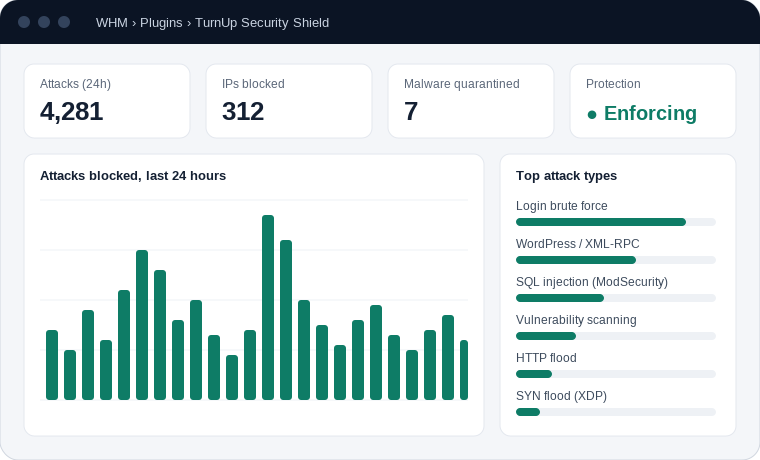
The central console shows your whole fleet live: every attack, block and malware finding, on every server. On cPanel servers you also get a full dashboard in WHM, and your customers get their own page in cPanel showing what was blocked on their sites. On any server, tusctl gives you the same answers from the command line.
Built to stay out of the way
- Lightweight: one small native program, about 10 MB of memory in testing.
- Plays well with your stack: works alongside CSF, firewalld, Docker and your existing ModSecurity setup, never replaces them.
- Accurate: verified search engines, your own IPs and CSF allowlists are never blocked.
- Your customers see it too: a cPanel page shows each customer what was blocked on their own sites.
Simple pricing per server
Solo
$6/mo per server
or $60/yr 2 months free
For a VPS or dedicated server with one site owner.
- 1 account or website
- XDP DDoS and flood protection
- Brute-force and web attack blocking
- Malware scanning and quarantine
- Fleet intel and AI-drafted rules
- Central console, WHM and cPanel dashboards
- Email support
Starter
$12/mo per server
or $120/yr 2 months free
For agencies and small hosts.
- Up to 30 accounts or websites
- XDP DDoS and flood protection
- Brute-force and web attack blocking
- Malware scanning and quarantine
- Fleet intel and AI-drafted rules
- Central console, WHM and cPanel dashboards
- Email support
Business
$19/mo per server
or $190/yr 2 months free
For shared hosting servers.
- Up to 250 accounts or websites
- XDP DDoS and flood protection
- Brute-force and web attack blocking
- Malware scanning and quarantine
- Fleet intel and AI-drafted rules
- Central console, WHM and cPanel dashboards
- Priority support
Unlimited
$29/mo per server
or $290/yr 2 months free
For large, dense servers.
- Unlimited accounts and websites
- XDP DDoS and flood protection
- Brute-force and web attack blocking
- Malware scanning and quarantine
- Fleet intel and AI-drafted rules
- Central console, WHM and cPanel dashboards
- Priority support